

Vẽ lại hình bằng TikZ từ ảnh
Tải ảnh hình vẽ lên, AI vẽ lại thành hình nét và mã TikZ để dùng trong đề thi, Word hoặc LaTeX.
Dùng thử
AI vẽ, có thể sai. So lại với ảnh gốc.
AI Học nè: 160 credits một hình · Dùng được AI của bạn
Ví dụ
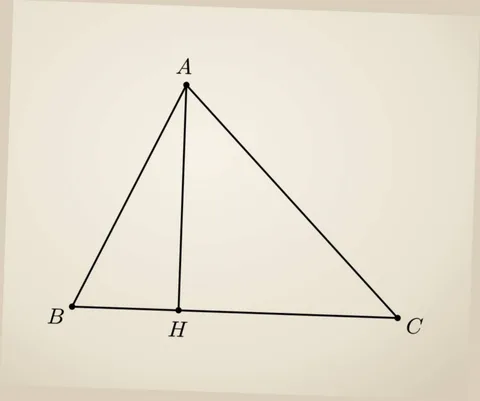
Mã TikZ
\begin{tikzpicture}[x=0.0030366cm, y=-0.0030366cm, line cap=round, line join=round, lw/.style={line width=#1*0.0864pt}, cap/.style={scale=#1*0.0126501, fill=none, inner sep=1pt}, dash/.style 2 args={dash pattern=on #1*0.0864pt off #2*0.0864pt, line cap=butt}]
\path (0,0) rectangle (1000,835);

\path (388,178) coordinate (A)
      (151,639) coordinate (B)
      (829,663) coordinate (C)
      ($(B)!(A)!(C)$) coordinate (H);

\fill (A) circle (7)
      (B) circle (7)
      (C) circle (7)
      (H) circle (7);

\draw[lw=4.2]
      (A) -- (B) -- (C) -- cycle
      (A) -- (H);

\node[cap=33.3] at (383,138) {$A$};
\node[cap=33.3] at (117,658) {$B$};
\node[cap=33.3] at (865,679) {$C$};
\node[cap=33.3] at (371,685) {$H$};

\end{tikzpicture}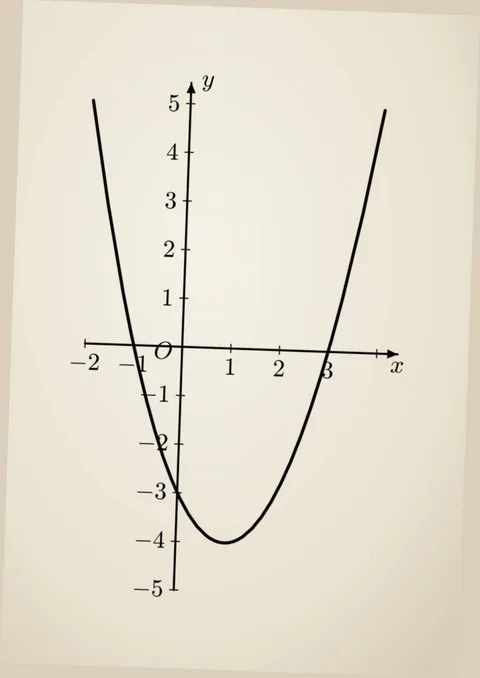
Mã TikZ
\begin{tikzpicture}[x=0.0042892cm, y=-0.0042892cm, line cap=round, line join=round, lw/.style={line width=#1*0.12204pt}, cap/.style={scale=#1*0.0178682, fill=none, inner sep=1pt}, dash/.style 2 args={dash pattern=on #1*0.12204pt off #2*0.12204pt, line cap=butt}]
\path (0,0) rectangle (708,1000);

\path
  (269,512) coordinate (O)
  (125,507) coordinate (Xstart)
  (586,523) coordinate (Xtip)
  (256,871) coordinate (Ystart)
  (283,123) coordinate (Ytip)
  (138,149) coordinate (Pleft)
  (331,801) coordinate (Pvertex)
  (570,164) coordinate (Pright);

% Hai trục tọa độ.
\draw[lw=2.6,-{Latex[length=2.2pt,width=1.6pt]}]
  (Xstart) -- (Xtip)
  (Ystart) -- (Ytip);

% Các vạch chia trên hai trục.
\draw[lw=1.6]
  (125,501) -- (125,513)
  (341,509) -- (341,521)
  (413,511) -- (413,523)
  (557,516) -- (557,528)
  (275,154) -- (289,154)
  (272,225) -- (286,225)
  (270,297) -- (284,297)
  (267,369) -- (281,369)
  (265,440) -- (279,440)
  (259,584) -- (273,584)
  (257,655) -- (271,655)
  (254,727) -- (268,727)
  (252,799) -- (266,799)
  (249,871) -- (263,871);

% Các dấu trừ.
\draw[lw=2]
  (105,535) -- (122,535)
  (162,540) -- (179,540)
  (220,583) -- (230,583)
  (192,655) -- (209,655)
  (204,727) -- (221,727)
  (201,798) -- (218,798)
  (199,870) -- (216,870);

% Đường parabol.
\draw[lw=4.2]
  (Pleft)
    .. controls (194,581) and (259,799) .. (Pvertex)
    .. controls (403,804) and (482,591) .. (Pright);

% Nhãn trục và gốc tọa độ.
\node[cap=26.55,xscale=0.85] at (308,122) {$y$};
\node[cap=24.3,xscale=0.87] at (586,542) {$x$};
\node[cap=25.1,xscale=0.9] at (241,529) {$O$};

% Nhãn trên trục tung.
\node[cap=16.2,xscale=1.24] at (257,157) {$5$};
\node[cap=25.1,xscale=0.88] at (254,224) {$4$};
\node[cap=25.1,xscale=0.88] at (251,296) {$3$};
\node[cap=25.1,xscale=0.80] at (249,367) {$2$};
\node[cap=25.1,xscale=0.56] at (247,439) {$1$};
\node[cap=25.1,xscale=0.64] at (242,581) {$1$};
\node[cap=25.1,xscale=0.80] at (224,653) {$2$};
\node[cap=25.1,xscale=0.88] at (237,725) {$3$};
\node[cap=25.1,xscale=0.88] at (234,796) {$4$};
\node[cap=25.1,xscale=0.80] at (232,868) {$5$};

% Nhãn trên trục hoành.
\node[cap=25.1,xscale=0.80] at (139,533) {$2$};
\node[cap=25.1,xscale=0.64] at (194,538) {$1$};
\node[cap=25.1,xscale=0.64] at (339,541) {$1$};
\node[cap=25.1,xscale=0.80] at (412,544) {$2$};
\node[cap=25.1,xscale=0.80] at (486,546) {$3$};
\end{tikzpicture}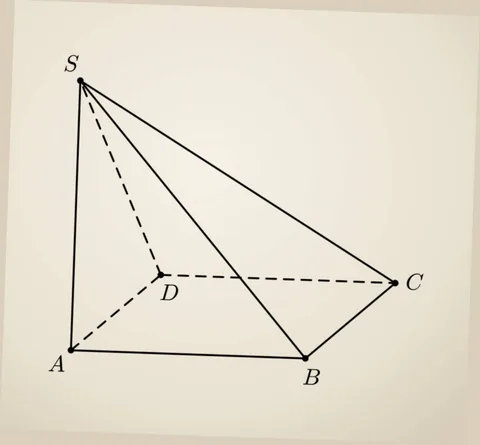
Mã TikZ
\begin{tikzpicture}[x=0.0030366cm, y=-0.0030366cm, line cap=round, line join=round, lw/.style={line width=#1*0.0864pt}, cap/.style={scale=#1*0.0126501, fill=none, inner sep=1pt}, dash/.style 2 args={dash pattern=on #1*0.0864pt off #2*0.0864pt, line cap=butt}]
\path (0,0) rectangle (1000,927);

\path
  (170,180) coordinate (S)
  (135,815) coordinate (A)
  (310,610) coordinate (D)
  (635,815) coordinate (B)
  (840,625) coordinate (C);

% Dashed lines (hidden edges)
\draw[lw=4.2, dash={12}{8}] (S) -- (D) (D) -- (A) (D) -- (C);

% Solid lines (visible edges)
\draw[lw=4.2] (S) -- (A) (S) -- (B) (S) -- (C) (A) -- (B) (B) -- (C);

% Vertex dots
\foreach \p in {S,A,D,B,C}
  \fill (\p) circle (4);

% Labels
\node[cap=23] at (145, 160) {$S$};
\node[cap=23] at (110, 835) {$A$};
\node[cap=23] at (335, 635) {$D$};
\node[cap=23] at (635, 850) {$B$};
\node[cap=23] at (870, 625) {$C$};

\end{tikzpicture}
Làm trong ba bước
Thả ảnh vào
Ảnh chụp, ảnh cắt từ PDF, hình vẽ tay.
Chọn AI vẽ
AI Học nè hoặc AI của bạn.
Tải về hoặc chép mã
PNG, SVG, PDF hoặc file .tex.
Câu hỏi thường gặp
TikZ là cách vẽ hình bằng mã trong LaTeX. Hình vẽ bằng TikZ luôn nét khi in, và sửa được từng chi tiết ngay trên mã.
Công cụ liên quan
Cập nhật 14/11/2026